

LEARN BY DOING
Your learning, at your pace.
Follow a task, try it in IPPO, and pick up where you left off.
Beginner checklist
0 / 6 complete
- Set up your account ↗
- Explore your first guide ↗
- Record your first capture ↗
- Generate your first guide ↗
- Review and edit your guide ↗
- Export and share ↗
Check a task once you have tried it in your workspace.
Getting started with IPPO
Visual walkthrough
 1 / 5
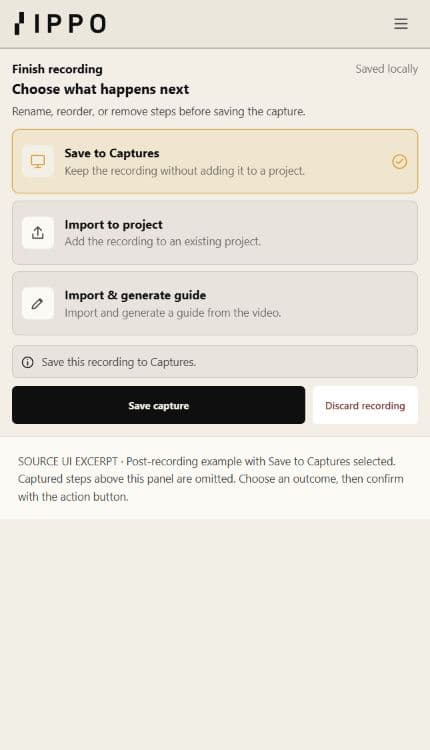
1 / 5Choose what happens next
Source UI example after stopping a recording. Save to Captures is selected, so the confirmation is Save capture. Captured steps above this panel are omitted.
- Choose the destination that matches your task.
- Review the captured steps before confirming.
- The confirmation label changes with the chosen destination.
Your saved articles
Bookmark an article while reading to keep it here.
Recently viewed
Your reading history appears here after you open an article.
Help where you work
Open the ? button in IPPO to find guidance for the current dashboard or editor.
Try contextual help ↗The drawer links to the same reviewed articles.
Downloads & notifications
Take the public Help Centre with you. Searchable HTML includes available screenshots and works offline.
Subscriptions are saved to your account. Updates are delivered in IPPO when approved content or release handoffs are ready.
In-app delivery: no delivery recorded
Open account notifications →